


CONTENT MARKETING:
SEO Standards and Best Practices
SEO stands for search engine optimization. It is the process of getting traffic from free, organic, editorial, or natural search results in search engines.
Business owners utilize SEO practices to optimize their company’s website and other marketing platforms.
There are many ways that SEO is used to increase the ranking of your website, and they can be confusing if you don’t know where to begin.
This guide is here to help you understand current SEO standards and best practices so your company can make the most of your marketing efforts.
chapter ONE
DNS and URLs
DNS and URLs
The first step of establishing any website is to determine your domain name and the formulation of your URLs throughout your website. Determining these from the start will give you a boost when it comes to ranking on search results pages.
If any of the marketing terms in this article are confusing, you can use this guide.
Having an established domain with years behind the date of purchase can have an effect as well. When you purchase a new domain, you need time for Google to establish trust with your domain before it can begin to rank.
This is why new domains often take somewhere between 6 months to 18 months to start ranking for higher-volume keywords. Getting this foundation right is essential for technical SEO, helping your site rank faster on Google search and improving overall website visibility.
During this period, implementing strong SEO best practices and working with an experienced partner like Miles IT can help build trust and improve early search engine rankings.
DNS
It’s very important that you take SEO into consideration when you are establishing a domain name for your website. Be sure that the chosen domain is unique and easily found from a simple search.
A well-optimized domain also supports brand visibility and local SEO, while improving your chances of appearing in Google search results for relevant queries.
Tip: when purchasing a domain, avoid specific cities or states (if in the US) when buying a domain. Something like bestconstructionfirmNJ.com can seem spammy right out of the gate.
When creating a name for your business or product, SEO is important to consider.
If you choose a name that doesn’t have an available domain, you will have to be creative, which doesn’t lend itself well to organic search engine results.
First and foremost, it’s important that your site has an active SSL when establishing your domain. If it doesn’t, then you’ll run into issues with a messy https:// or other domain errors.
In addition,you need to be sure that your domain defaults to www. – even when the www. isn’t typed. This allows for a cleaner search and a less cluttered DNS (Domain Name System).
Generally, it is best to omit the www, even though there won’t be negative impacts if you keep it.
Whether you keep or omit it, ensure consistency across your site. If you have some pages with the www and some without, this leads to crawl errors within Google and can lower your website’s ranking.
Secure domains (HTTPS) are a confirmed Google ranking factor and play a critical role in website security and user trust. Businesses today often combine secure DNS configurations with managed IT services from providers like Miles IT to ensure ongoing monitoring, uptime, and protection.
URLs
Now that you’ve established your domain, it’s important to consider the URLs themselves.
The best practice for URLs is to keep them short and concise.
Ideally, URLs shouldn’t be more than 75 characters long.
As a general guideline, they can be up to 100 characters.
When creating a URL, always remember to aim for clarity. If you have to shorten a page title, make sure the meaning is still present.
Users should still be able to understand the topic of your page from the URL.
If there are multiple words within a page title, each of the words should be separated by a hyphen in the URL.

One example would be /blog/everyone-needs-a-friend-pets-and-seniors
Canonical URLs
A canonical URL is indicated when there is a possibility of multiple pages having the same or similar content. Marking one of the pages as canonical means it will be the one that shows up in search results. It also ensures Google won’t penalize the site for content duplication.
The best practice for canonical URLs is to place one on the homepage. This is because your homepage is likely to reference some of the content on other pages as an overview of your site.
It’s important to have canonical URLs on those self-referencing pages, especially if they are creating dynamic URL strings.
Proper canonicalization is critical for avoiding duplicate content issues and strengthening your SEO strategy. Many businesses rely on experienced providers like Miles IT to audit and optimize their technical SEO setup, ensuring correct indexing and improved search performance.
If you are using WordPress, all of this is managed with Yoast.
Tools like Yoast help streamline on-page SEO, but a broader strategy involving technical SEO audits and performance optimization is key for long-term growth.
No matter what you choose for your URL, it’s important to remember that using a keyword will help tremendously when helping your page rank.
chapter TWO
Keyword Research
Once you’ve decided what your domain name is going to be your marketing team should conduct some thorough keyword research.
To conduct keyword research you can utilize Google to determine what words or phrases are trending for your business, service, or subject matter.
Google search suggestions and autocomplete are valuable for discovering long-tail keywords and understanding search intent, especially for users asking conversational queries.
The internet also has many tools that could be useful for whatever your SEO needs may be.
Google Trends – This tool allows you to find out up-and-coming keywords that may not have much competition yet.
Keyword volume can spike based on outside influences. COVID-19 for example was never searched before 2020 but exploded for obvious reasons.
This tool is especially useful for identifying trending topics, low competition keywords, and seasonal search patterns that can drive early traffic.
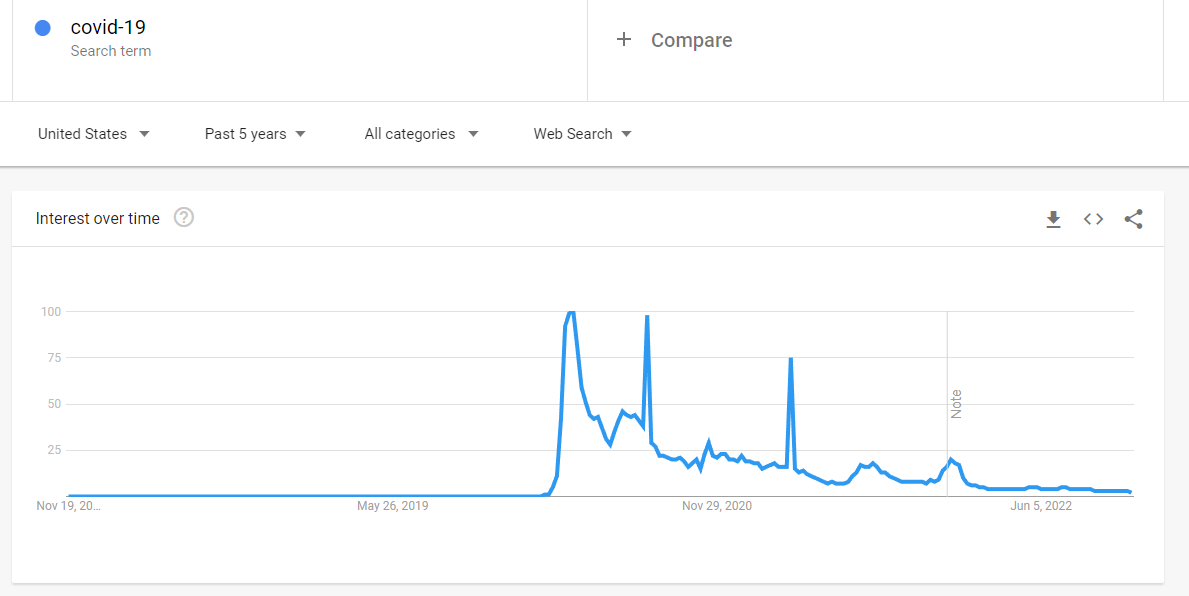
There have been some spikes over the past few years, but in general, the topic is nowhere near as relevant as it was during the peak of the pandemic.
SemRush, UberSuggest, and Soovle –
Like Google, these tools can help you determine SERP (Search Engine Results Page) relevance for a given keyword as well as related terms and autocompletes.
SEMrush is an amazing SEO tool that allows you to spy on your competitors, gain a better understanding of your current traffic, and view your paid advertising efforts.
These platforms are essential for building a strong SEO strategy, allowing businesses to uncover low competition keywords, analyze competitors, and improve organic traffic. Many organizations work with experts like Miles IT to interpret this data and implement it effectively as part of their broader digital marketing strategy
Forum Sites (such as Quora or Yahoo! Answers) –
These sites can help you determine questions that people are asking. Simply search for a topic related to your niche and instantly see groups dedicated to your theme and specific questions from real users.
You can also see answers to these questions, which can help determine the content that should be on your website.
If you find a Quora answer, but no specific website that ranks for your questions, you may have found a topic niche to write about.
This approach helps uncover People Also Ask (PAA) queries and voice search keywords, which are increasingly important for modern SEO.
chapter THREE
Technical SEO Aspects
Images
Optimizing images to meet SEO standards is just as important as optimizing text. Google can’t read images on its own and needs to identify designated alt text.
In search results, images appear based on their alt text and file names.
Therefore, it is very important that you follow SEO standards for all of the images on your site.
Photo Size – Make sure your photos are all compressed for optimal load speeds.
File Name – You should always be sure that your image’s file name is short and descriptive. For example, happybaby.jpg
Alt Text – Just like with the file name the alt text should accurately describe what the image is. This is both for SEO and ADA purposes. For example, Happy baby in a yellow onesie.
URL – The URL for your image should be similarly easy to read and understand. For example, photos/happybaby.jpg.
Title/Caption – If your image needs a title or caption, use descriptive language to communicate the meaning and relevancy of the picture. If there is a photo credit attached, ensure that is listed in the caption.
Titles, Headers, and Meta Descriptions
Just as your URLs should help determine meaning, your meta titles, meta descriptions, and headers should convey the content and relevance of your pages. All of these are important for rankings in search results.
If your meta titles, meta descriptions, and headers fail to use any of the trending keywords for your website’s topics, then you will not on search results.Make sure the language used in these three items fits the subject matter of your website.
Previously, search engines simply looked for the keywords. Now, if you have words that are similar to those keywords, you could potentially still rank. Either way, keywords are important and heavily influence SEO.
Meta Titles
The most important point about meta titles is that they shouldn’t be longer than 65 characters. Anything longer than that could get cut off on search results pages – which doesn’t help readers find the correct content.
It is also crucial that you communicatethe point of your page through the title. If the usercan’t determine the subject of your page from the title, they aren’t going to engage further with your content.
Headers
If your page has multiple sections, choosing the right subsection titles is critical. Google will scan these sections of the page to see if they are relevant to a particular search.
Each page can have a header 1 (H1), header 2 (H2), all the way down to H6.
Think of the Header 1 (H1) as the main topic of the page. You should always have one H1 on every page of your website. Otherwise, you’ll confuse Google about the main topic of your page.
From here, you’ll want to use Header 2s (H2s) to create sub-sections that stem from your H1. Each H2 should branch off from the main idea of the H1.
If you have a sub sub-topic, you’ll use H3s and so on.
Think of each header as chapters of a book. The H1 is the book title, the H2 is a chapter, and H3s can be sections of each chapter. If H3s have sections, then you’ll use H4s.
Be aware of keywords and topics your customers might be searching for. This will help you create meaningful content throughout the page, not just in the title. Creating an eye-catching subsection title with relevant keywords will give your page a better chance of ranking.

Meta Descriptions
Another way for your website to rank is through the meta description for each of your webpages. If you don’t add a meta description, Google will simply create its own description based on the content of your page.
Keep in mind that even if you designate a meta description, Google can ultimately determine what they want to show. If they feel that there is something better than what you have selected, they will use that instead. They always favor the user over any manipulation by webmasters.
Meta descriptions should only be between 150-160 characters. If you can accurately depict what your page is about and use relevant keywords, your page has an even better chance of ranking.
While keywords are helpful in meta descriptions, they are not a ranking factor. However, when users search in Google, their keywords are highlighted in the meta title, description, and URL. Therefore, if you have keywords in your meta description, users may be more likely to click.
If they click, then Google views your page as more valuable because it has a higher click-through rate (CTR) than your competitors. If this continues to happen over time, Google can increase your ranking.
Although meta descriptions are not ranking factors, they can indirectly influence your rankings.
chapter FOUR
Page Setup
The most important aspect of SEO is your page and content setup.
If Google can easily crawl your site and pick out important keywords from your pages, then you are more likely to rank on search engine results pages.
Keep the following aspects in mind to help your content rank higher.
Page Speed
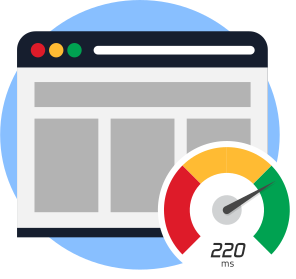
One of the most important considerations when setting up your webpages is the rendering speed of your website’s content.
If users visit your website and it takes a long time to load, they will bounce, or leave. Google will then deem this page as poor quality because it doesn’t answer users’ questions – they didn’t stick around long enough to find their answer.
This “pogo” action of clicking a website and bouncing back to the search engine results page (SERP) will negatively affect your website’s ranking.
It’s important to keep your page speed in mind when formulating the layout and content of your pages. Using too many heavy images or too much javascript and other code can cause longer load times.
- Compress files larger than 150 bytes
- Minify CSS, JavaScript, and HTML
- Reduce your redirects
- Remove render-blocking JavaScript
- Leverage browser caching
- Improve time to first byte
- The Time to First Byte metric captures how long it takes your browser to receive the first byte of response from a web server when you request a certain URL. Average TTFB is 100-500 ms; Aim for under 200 ms.
- Optimize your images
It’s also important to remember that your website’s landing page should be optimized for page speed more than any other page on your website. This page is designed as an advertising tool and should load quickly, contain navigation elements, share vital company contact information, and be mobile-friendly.
Crawl Budget
Your website has a crawl budget, which is simply the number of pages Google will crawl from your site each day. By optimizing your crawl speed, you can optimize how many of your pages Google wants to crawl every day.
To help Google, you’ll want to make sure that your pages link to each other. Having too many orphan pages means Google is less likely to find all of the important pages on your website.
You only need to worry about optimizing crawl budget if your website has thousands of pages.
Content Length and Structure
Ideally, the perfect length for any page of content is no less than 500 words. For blogs, you’ll want to have an average of 2,000 words.
Staying within these guidelines will allow your content to contain more keywords that will place you on search results.
The more content you can create for a topic, the more likely your customers will trust your authority on the subject.
Another way to build authority is by ensuring that your content is relevant to your business and brand. You want website visitors to easily see the content that relates to your story, services, and who you are individually – i.e. bios, images, position titles, and more.
Centering your H1 and H2 content around the top keywords for your field will help optimize your website for SEO. Google loves crawling titles and headers to determine whether your page matches search queries.
Proper Use of Keywords
We keep mentioning keywords because they are vitally important in helping your website and content rank on any search results page relating to your field.
It used to be that if you randomly dispersed popular keywords for your business throughout your website, Google would see that and rank your webpage, whether the keyword placements made sense or not. However, Google has now gotten smarter, so your placement and proper use of keywords is even more important.
Using multiple keywords or phrases will help your SEO tremendously. No one wants to read content that has the same word repeated over and over again, sometimes unnecessarily, just so your page can rank higher.
By conducting comprehensive keyword research, your webpages can have unique content that relates to your field while also maintaining varying and appropriate word choice.
You can also rank as a rich snippet on Google if you properly structure content around the keywords.
Ideally, you’ll want to answer a searcher’s question.
Rich snippets appear in a prominent box at the top of any SERP and may feature images. They are no longer than 160 characters in length and directly answer a search query. These snippets have a higher click-through rate and gain the most traffic.
Internal Linking
One aspect of SEO that search engines love is webpages that link to other pages within your website. This cross-stitch of page connections helps Google see that your content is all related to each other.
It also helps website visitors find related content based on what they found through a search engine results page. SEO measures how much authority your webpage has over another result, so linking related content within your pages is important to show that you consistently post about this topic.
Word to the wise: internal linking should never rely on 301s, so be sure all of your links are accurate and current.
When completing an audit of your website, you can utilize Screaming Frog to help find any links that are 301s or have some other kind of link error.
Indexable Content
OnceGoogle and other search engines have crawled your site, they will to index the content on your page for quicker finds moving forward. There are multiple content items that will be indexed by a search engine, so it is important that you follow SEO best practices.
HTML Webpages – A webpage that contains HTML format is the best practice for SEO. Instead of placing important text on images, they should be placed directly on the webpage in order for the page to be crawled and indexed correctly.
PDFs – If your webpage contains PDF files, those can be indexed by search engines as well. While this format works, it’s preferable foryour webpage to be HTML for crawling purposes. Ideally, you should create an HTML page for any PDF file you wish to have on your website.
JPG/PNG/GIF Images – Images can be indexed based on the file names and alt text. This is why it’s important to make sure your images are all labeled correctly and include descriptive names/text.
Videos – Videos can be indexed by search engines if you’re properly using video schema to help the process. It’s a best practice to have transcripts for your videos because search engines can’t crawl or index audio.
Another point about indexable content is that you can use Robots.txt and XML sitemaps to tell Google which pages should be indexed and which ones should be ignored.
Optimizing Your UX
One vital aspect of SEO is ensuring that website visitors have a great experience and stay longer to explore more. Your website isn’t going to rank well if visitors come to your home page and then quickly bounce off to visit a different site.
When determining how to optimize your website’s UX, there are a few areas you need to consider: navigation, call to action, general UX, and images. Tools such as Google Analytics, HotJar.com, and more can help you evaluate your website and createthe proper userexperience.
Navigation – Your navigation should encourage responsiveness and beeasy to interpret and interact with due to universally recognized icons. It’s also important that you include links to contact or clicks to call. Finally, you should consider a sticky header that follows the user as they scroll or navigate the page.
Call to Action – Any call to action should be noticeable and stand out against all other text. You want to encourage the user to click on the button and complete an action. Most commonly, these buttons are used for contacting the business, applying for a job, or leaving feedback.
General UX – First, don’t try to impress the user with fancy language that is hard to understand – keep it simple and professional. You should also ensure that you utilize visual hierarchy with regard to typography and graphics. There should be consistency in your layout and design from one page to the next. Try to avoid form fields whenever possible and ensure that your pages aren’t overwhelmed with too much content,text or otherwise.
Images – Optimizing your images for UX is the same as optimizing them for SEO. It’s important to compress files and properly label them to ensure crawl speeds are faster and the page ranks higher in searches.
Versatility in Layout

One great way to rank on search results pages is to ensure your webpage works on both desktop and mobile. Having a clean layout on all devices ensures that Google can crawl your pages without error and easily index important elements.
Google offers a testing tool to see if your webpage translates well to mobile devices, so consider using this when creating or updating your website.
Work on Link Building
Another way to rank higher for SEO is through link building to relevant sites. It works by giving other sites a reason to believe in your authority as a content contributor for your field.
By strengthening your links between websites, you can increase traffic flow to your website in exchange for giving other sites traffic. Increasing the amount of users who visit your website is important for building your SEO ranking and authority overall.
chapter FIVE
YouTube and Google My Business

YouTube/Video Optimization
SEO matters even for a YouTube channel – especially if you utilize such ventures to further promote your business. Google only includes videos in the search results for certain keywords such as:
- How-to keywords (“how to shave a cat”)
- Reviews (“beats by Dre review”)
- Tutorials (“Setting up WordPress”)
- Anything fitness or sports related (“Cardio kickboxing”)
- Funny videos (“Cute animals”)
Other ranking factors
- Retention factor – Make your content engaging so that viewers keep watching
- Engagement – Encourage comments, likes, and shares.
- “Subscribes” after watching a video – Encourage your viewers to subscribe to your channel
- Click-through rate – Create compelling thumbnails and titles. Use high contrast colors and consistent layout and colors. Use large text.
Tips for Ranking
- Say your keywords in the video – YouTube provides transcriptions.
- Use playlists to auto-play other videos in your channel for more views.
- Title – Use your keywords early in the title and make it at least 5 words long.
- Description: Include your keyword in the first 25 words. Make the description at least 250 words. Include your keyword 2-4 times.
- Tags: Target keyword(s), variations, related topics.
Google My Business
A Google tool that can help increase visibility for your business and website is Google My Business (GMB). You can post your business to Google Maps along with helpful content that will help drive traffic to your website.
Because your GMB has specific information with your local address in it, it can naturally help your website rank locally.
Check out these GMB standards to help your business rank higher on Google.
- Have high-quality images of your location(s) – make sure you have at least 2 images of each type (interior, exterior)
- Weekly posts to GMB
- Stay on top of your business profile creation to ensure completion within hours
- Verify your location by postcard
- Keyword-rich descriptions
- Set up shortname (link to process) – gives people an easy way to find you to review
chapter SIX
Page Audits
Finally, always remember that regular keyword research and audits done can help you stay ahead of the competition when it comes to SEO. Ideally, you should conduct an audit every quarter so you can easily find any 301s or 404s that may be slowing down your website and lowering your rankings on SERPs.
Fixing these errors improves website crawlability, enhances user experience, and supports better visibility in Google search results.
An SEO audit will also help you stay on top of the pages being indexed by Google. If you have pages that you want to remain hidden, this practice will keep them from being accidentally indexed.
What Comes Next?
Optimizing SEO on your business website and other platforms can help increase visibility, authority, and more for your company.
Miles IT has marketing experts who can help develop a robust SEO marketing strategy for your business.
Our experienced professionals who specialize in developing and implementing data-driven SEO strategies, including keyword research, technical SEO audits, and content optimization to help businesses improve rankings and drive consistent organic growth.
If you’re interested in a consultation or have questions about your website, contact us today.