


BUSINESS SOFTWARE
The Ultimate Guide to Improving Existing Systems
This guide will expose you to various methods for getting the MOST productivity and value from the software used to run your business.
In this guide, you’ll learn about:
- Uncovering opportunities
- Creating an improvement roadmap
- Extracting more value from existing systems
Let’s get started.
chapter one
Identifying Your Areas of Need

If you’re here, you likely have a system that’s not living up to its potential.
It doesn’t have to be this way–even if you’re holding on to legacy software!
The first step towards getting the most value from existing software systems is by assessing how your systems are being used today and by whom.
Perform a business analysis
Whether you are running an end-to-end process analysis or looking at a specific subset, you must start by creating a plan. Now’s the time to start jotting down some notes. Start by identifying the process you are trying to improve or a step before the process, if possible.
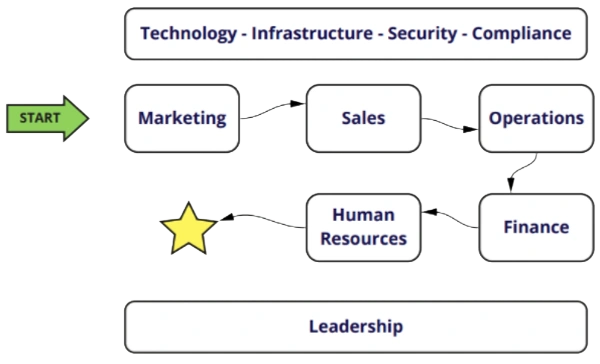
As you go through, your goal for each process should be to understand the resources that are being used:
- Technology
- Infrastructure
- Security
- Compliance
In each of these areas, are you state-of-the-art or behind the curve? Grade yourself on where you stand in each of the categories from 1 to 10.
Look out for red flags!
As you are rating your processes, take a closer look at your lowest rated areas. Be specific about what slows your team down and any redundancies, outdated solutions, or workarounds.
For example:
- Using paper documents to store data
- Heavy reliance on spreadsheets
- Adapting processes to the constraints of your business technology
- Shadow IT (Use of unapproved applications by staff to solve a need)
- Inability to deliver on customer or vendor requests
Make sure to take note of any issues your team incurs.
Get to the root cause
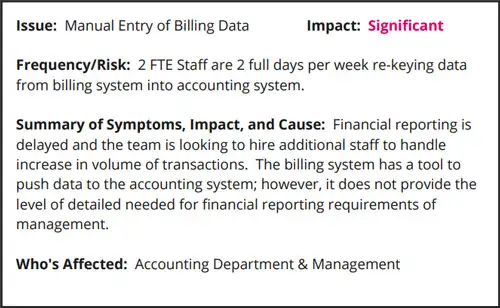
For each item that you’ve flagged, you’ll want to dig deeper into the symptoms, impact, and cause.

Identify the symptoms. What made you feel there was an opportunity for improvement? Often it’s explicit as someone saying, “I need to be able to do X, Y, and Z.”
Now, look at the impact in terms of the work being done, time, and dollars.
Then get to the why. What are the perceived constraints your team is dealing with? What can’t they do?
Now start to prioritize
This is where you set the stage for finding solutions. What could have the most significant impact? What is the potential opportunity of making the change or the risk of not? Is the solution simple or complex?
Now that you know the issues and priorities, it’s time to do something about it!
chapter TWO
Initial Adjustments
You’ve identified the areas of your business in most need of improvement.
So, where to start?
The best place to begin is by streamlining what you already have in place today.
It’s the processes that you perform the most which will benefit the most from streamlining.
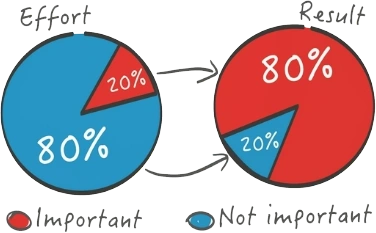
Think quantity (how often you perform the task) multiplied by impact (time or money saved). Any incremental change on something you do a lot of is going to have a BIG value. If you identified an area of need that falls within this 80%, make it a priority.
Work Smarter
You always want to find the best way to do something before throwing all your effort into it. The best way to do this with the tools you already have is to look for ways to redefine the box. How you use your software is up to you, even if it’s not the way your software was necessarily intended to be used.
Look at the people who are the most effective. What are they doing that can be standardized? If there are specific ways to use your software so that it’s better for you, DO IT!
Electronic Collaboration
You probably already have the tools you need to file share and communicate in a much more collaborative way—think Microsoft 365 or G Suite.
Most of these platforms have these collaborative features built-in, yet they are still underutilized.
- Direct file sharing
- Instant messaging
- Tagging people within documents
If you have an office suite tool, there should be nothing stopping you from going paperless. There’s no reason you should be printing things out, dealing paperwork around your office, or using paper documents to store information. Often, these tools allow you to collaborate right within the file at hand, which is exactly how you should be using them to provide the most context.
The more context that surrounds your conversations, the better.
chapter THREE
Create a Roadmap
Before creating your technology roadmap, you must identify the most critical focus areas and initiatives as discussed in Chapters 1 and 2.
This chapter will help you plan and create the steps necessary for achieving your vision of how operations should run.

What to prioritize
At this point, you should have a list of items that require your attention. Once you have a list of important initiatives, it is time to start creating a strategic roadmap.
The first step is to prioritize based on effort and value. How much effort will it take to resolve the issue, and what’s the value of doing so?
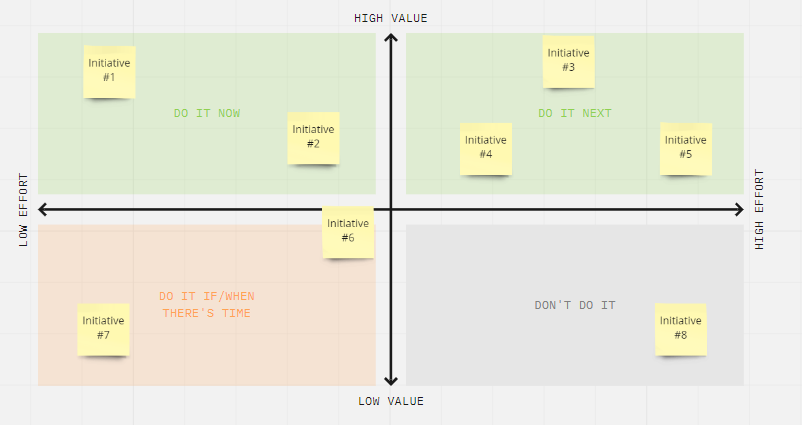
Items that are low-effort and high-value are the low-hanging fruit. High-effort and high-value items are typically worthwhile, big impact initiatives. Low-value items are not important to focus on unless they happen to be low effort as well. Then it may be worth taking that small amount of effort to solve the issue.
However, to start, keep your focus on the top of your chart.
When to work on your initiatives
After narrowing down your list to the items, you want to focus on, bucket your initiatives!
An easy way to start to build out your roadmap is to evaluate all of the initiatives and bucket them into this quarter, next quarter, this year, and beyond.
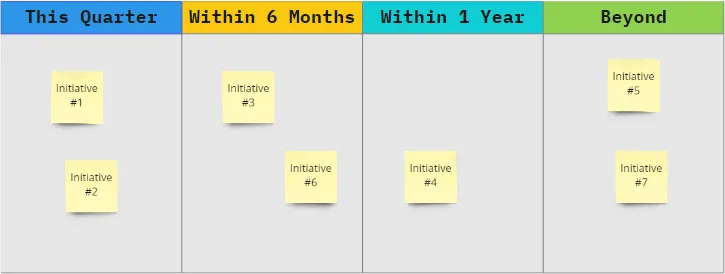
At this time, you will want to consider other factors beyond value and effort, such as end-of-life and renewal dates, compliance requirements, and alignment of related initiatives. Set realistic timeframes for getting your solutions implemented, and this will help build out your timeline for getting things done.
Who is responsible?
After you have laid out the general timeframe with a set of specific initiatives, assign an owner to each initiative. Figure out who is going to get it done. Then, outline the target timeline, impact, and estimated effort.
With a roadmap, personal ownership, and expectations in place, you can now manage your initiative with regular check-ins.
But what if you don’t know the solutions that will help? The next half of this guide will walk you through options for improving your system.
chapter FOUR
Options for Improving System Performance
You have a roadmap and a plan. Great!
Now it’s time to look at what solutions make the most sense for you.
This chapter takes a closer look at three options for getting improved speeds and performance from the systems you already have in place.

1. Organize and optimize data

Data organization dramatically impacts system performance, so do your best to reduce large data loads where possible!
A large data load refers to the slowing of your system when it’s trying to pull a substantial amount of data. This becomes an issue when most of the data your system pulls in is unnecessary for what you are trying to accomplish.
If you are experiencing long loading times due to data tonnage, consider optimizing both the data itself and how it gets pulled.
2. Install “smart upgrades”
If a newer version of your software exists but your current system works “fine,” you may be hesitant to upgrade. However, you don’t want to miss out on greater security, productivity features, and compatibility improvements.
While initial interruptions caused by an upgrade may be deterring you, it’s important again to consider the cost vs. value. Will any functionalities break when making the upgrade? How much of a disruption will this cause? Can the upgrade be done during off-work hours?
And most importantly…
What opportunities will this upgrade provide?
Make sure to consider the pros and cons of upgrading your software and think about the long-term benefits rather than the immediate frustrations that may come out of it.
Keep in mind: While you’re doing all of this, you’ll want to make sure you have appropriate backups running!
3. Upgrade your infrastructure
Is your system hosted on a platform that can fully support it? Maybe it’s not your software causing the issue. Before you blame your system, ensure all your hardware devices and cloud environment are sufficient. If processes seem slow and long load times are a problem, upgrading the infrastructure that supports your system may be necessary.
Alternatively, it could be that the devices your team or customers use to connect to the system require an upgrade.
Benefits and disadvantages of upgrading your systems
We recommend that all organizations regularly look into upgrading their hardware and software. However, businesses should be aware of the following pros and cons before making the jump.
Pros
+ Security
The most stable version of a software system is typically the newest. In the latest update, everything found to be insecure in the previous update has been improved, so hackers no longer have easy access to your device.
+ Productivity
Software usually becomes more powerful and intuitive with each upgrade, which is why adopting the latest and greatest can be so beneficial to accomplishing more.
+ Support
Providers of the software are more likely to provide the newest versions of an OS with the best support. Once your software reaches its end-of-life support, it’s time to move on if you haven’t already.
Cons
– Costs
Having the newest iteration of anything in technology can be costly (although some vendors provide volume or upgrade price incentives, so check out those options if you are considering this route). It can also disrupt your own day-to-day processes, which should be accounted for when budgeting.
–Incompatibility
Will your current systems and devices all work with the new system? That is always the biggest question you should ask and be prepared for when making an upgrade. Consider how long it will take and how much it will cost to get all systems up to par.
– Resistance
How big of a change is it? Any major changes to day-to-day processes may cause some backlash from employees. It’s essential that everyone is on board and understands the value the new system brings.
chapter FIVE
Options for Adding New Capabilities
If your needs are beyond that of a performance upgrade and you require new functionality to accomplish your tasks, then it may be time to consider extending your systems capabilities.
This chapter will demonstrate how to make a significant impact at little to no cost and unlock endless possibilities with integrations.
Why integrate your software systems?
The biggest reason to integrate is to eliminate time-consuming manual re-entry of data. With excessive manual work, there’s a greater chance for keying errors, missing data, and inconsistency, especially if more than one person is responsible for entering data.
Another common reason for integrating is when you use more than one system because they each provide unique and specific value. Often integrating them can give you benefits beyond what either provides. For example, imagine using a CRM software to track your leads and marketing sources and an accounting system to track your finances. Integrating those systems could give incredible insights into your most profitable marketing expenses based on actual client revenue.
Your goal should be to keep things simple for your team, and integrations can be a great way to automate redundancies and pair systems down.
Adding interconnected functionality
Technology is continually improving, and you have to contend with other businesses in your market to stay on top with the latest and greatest solution. The better your technology enables employees to perform or customers to interact, the greater advantage you will have over the competition.
Still haven’t adjusted for mobile use? You’re likely behind. Mobile devices officially surpassed desktop as the top source of web traffic back in 2016. But you don’t have to be out of the race altogether, and there is still time to catch up!
System integrations can help you add functionality to your business software by connecting existing systems. You can also add new, modernized solutions such as mobile apps and web portals optimized for mobile and desktop use.
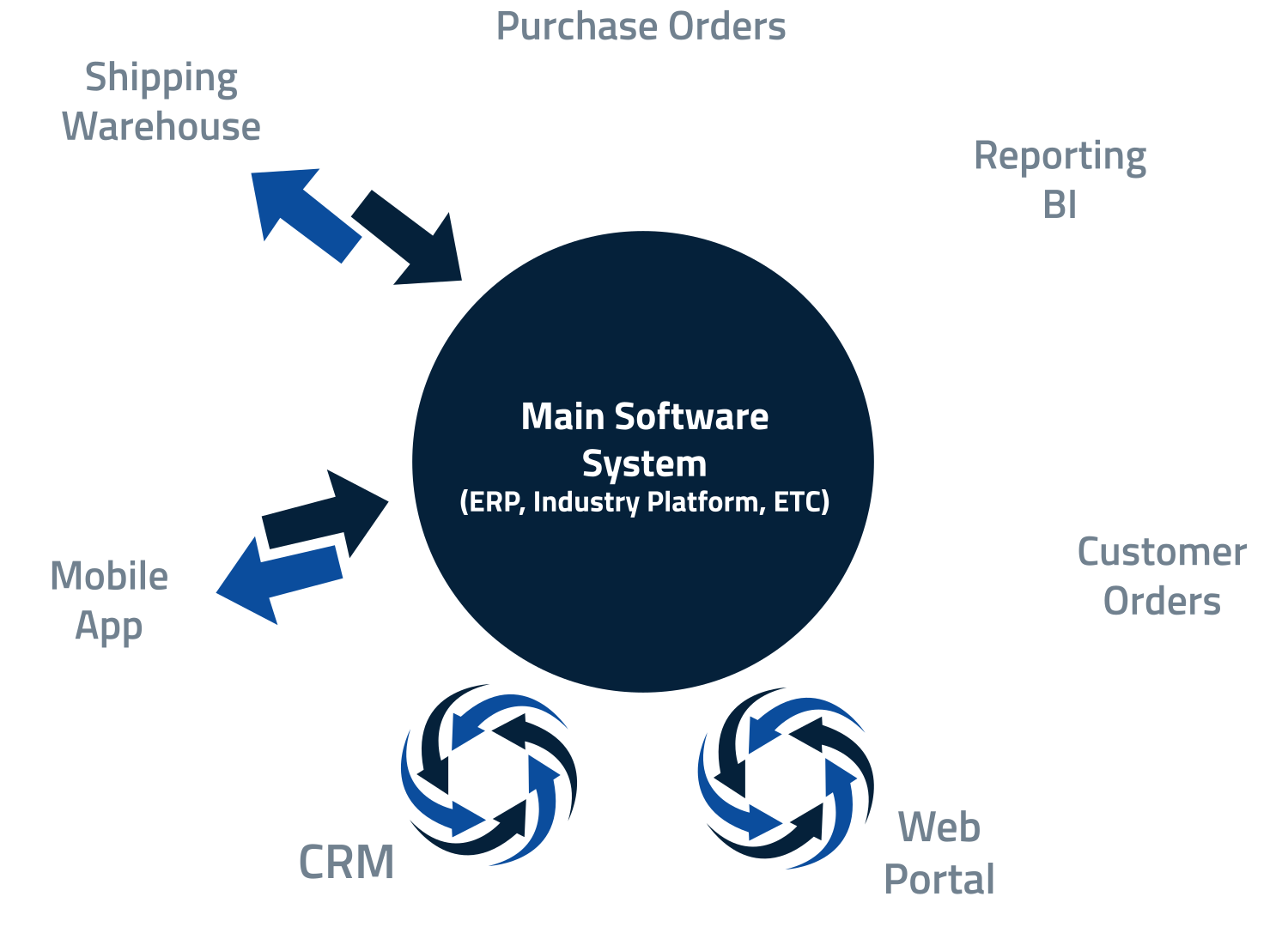
This image demonstrates a multi-system integration—many systems that are highly capable of performing specific functions, all tied together to work as one. If another software on the market offers the functionality you need, you can use API integrations to merge that software’s functionality into your core system.
To get the most out of your integrations, use a modernized dashboard that allows you to have all the information you need, KPIs, contact information, communications, schedules, and more, right at your fingertips, whether on desktop or mobile.
Get real-time data with business intelligence (BI) dashboards
Do you have a clear view of your KPIs? Seeing is believing, especially when it comes to convincing others.
If your data is stored in multiple systems and is difficult or time-consuming to gather together, consider modernizing with a custom business intelligence dashboard or other reporting solution. A dashboard can be added to your existing business systems using API or other integration tools.
Dashboards enable you to create customized reports and view your KPIs or other pertinent information in an easy-to-digest format.
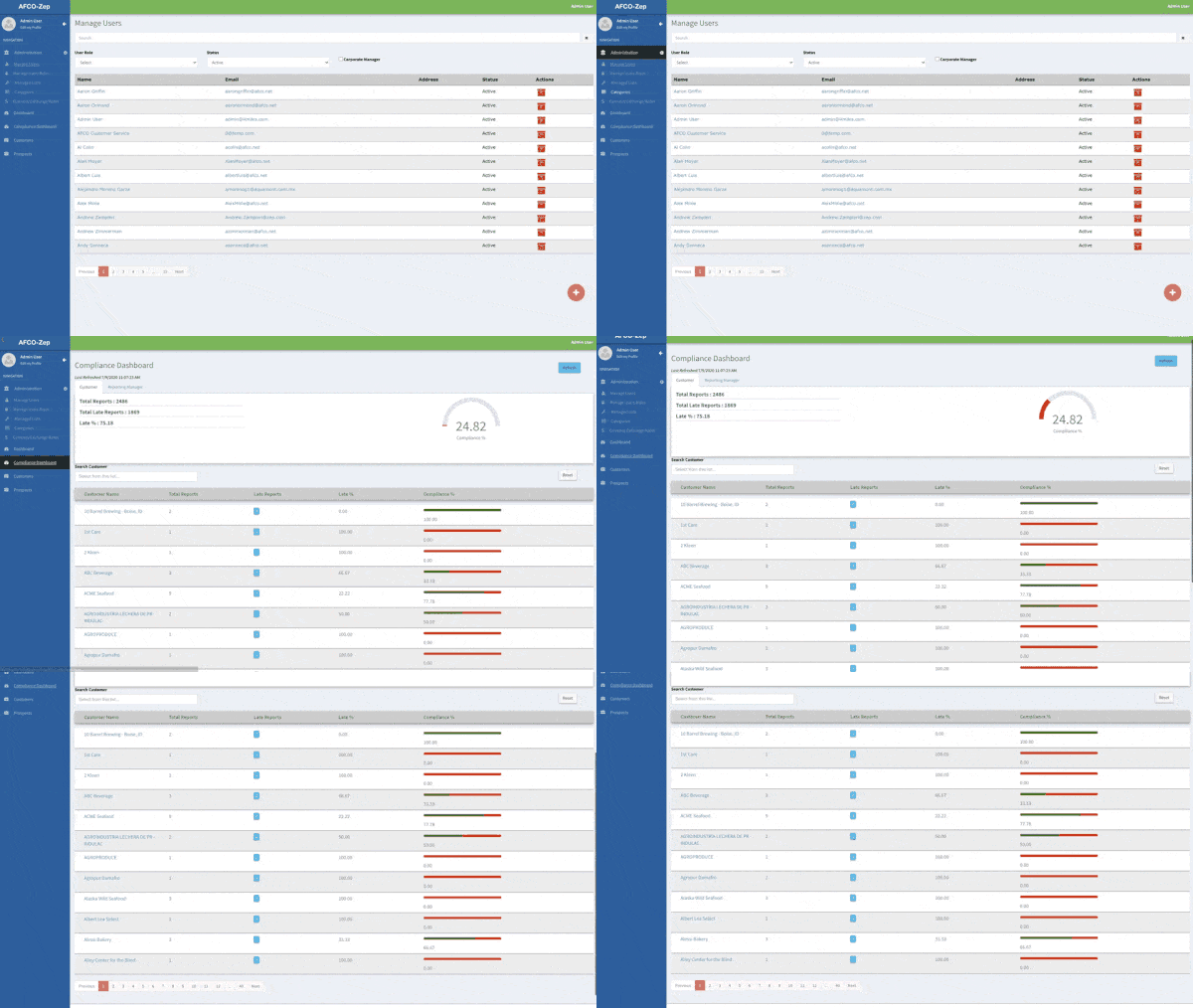
Key reporting features to consider
Dashboards are one of the best tools for keeping your team organized by providing everyone quick and easy access to what they need to get their job done all in one place.
Here are just a few features you can implement for better organization and sharing.
- Customizable interface
Display information precisely the way you want. Creating a custom dashboard allows you to simplify how users access your system’s data while providing them with more meaningful insights. - Filters & Parameters
Save selected filters and parameters for quick access and ease of use. - Report Sharing & Exports
Easily share reports with other people, including people outside of your company. Options for exporting data include CSV, PDF, Excel, and other formats. - Scheduled Reports
Ensure consistency by scheduling reports to run automatically. - Notifications & Email Alerts
Send notifications triggered when a new report is created.
chapter SIX
Turn Your People Into Power Users
Set your people up for what they do best!
Reaching the full potential of your business’s output means connecting great users with great tools.
This chapter covers how to ensure your people have the tools they need and are using these systems to the fullest.

It’s all about providing the right user environment!
Is your environment causing more issues or slowing things down than your software?
The user environment is about everything OUTSIDE the software. This is all about Human Performance Optimization—optimizing the performance of anyone that uses the software. Look at how your team is set up, their workspace, and the tools you provide.
Workspace essentials
Does your work environment foster productivity?
- Desks, Chairs, & Keyboards: Ergonomics is essential for health
- Comfort: Employees that feel great are typically happier and more engaged
- Accessibility: Easy access to computers and peripherals
- Beyond The “Stuff”: Physical flow in the office, shared devices, paperless approach
Tool essentials
Do your people have modern technology?
- Modern Computers: Your computers need to keep up with your people
- Multiple Monitors: Provides a larger, more manageable workspace
- Peripherals: Keyboard, mouse, webcam, microphone, etc.
Being cheap with these essentials does not result in cost savings in the long run. So, don’t cut corners!
Additional tips
- Create simple process docs for the work processes that take up the most time (think 80/20 rule)
- Train new team members and retrain the “teachers” of your team
- Follow an “adoption is NOT optional” approach
Where to go from here
Congratulations on taking the first steps towards better systems and processes!
Hopefully, you are able to walk away from this guide with a better understanding of where to focus your efforts and a roadmap for getting it done.
If you’ve enjoyed this topic and what to dig in even deeper to these concepts, register for our Tech Talk video series!